


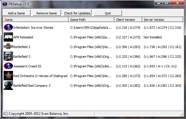


NOTICE: PunkBuster is designed to auto-update itself during gameplay.
PBSetup is the easiest method of manually updating
PunkBuster for most users (players and admins).
PunkBuster (Enemy Territory: QUAKE Wars) Security Files
The following files are only needed if your PunkBuster doesn't update by itself.
Right click the appropriate link below and choose "save as" to your "pb" folder -
make sure the file you save is saved with the filename shown below.
PunkBuster (Enemy Territory: QUAKE Wars) Player Client Files
The following files are only needed if your PunkBuster doesn't update by itself.
Right click the appropriate links below and choose "save as" to your "pb\htm" folder -
make sure the file you save is saved with the filename shown below.
Players only need the files that correspond to their Operating System, Server Admins need all six files.
PunkBuster (Enemy Territory: QUAKE Wars) Server Files
The following binary builds are only needed if your PunkBuster Server doesn't update by itself.
Right click the appropriate link below and choose "save as" to your home "pb" folder
(note: issue pb_sv_homepath in console to find pb's home folder for your game installation) -
make sure the file you save is saved with the filename shown below.
Then issue a /pb_sv_restart command to restart the PB Server with the new version.
Players do not need any of these files, Server Admins only need the file that corresponds to their Operating System.
Even Balance, PunkBuster and the PunkBuster logo are trademarks of Even Balance, Inc. in the U.S. and/or other countries.
All other trademarks are the property of their respective owners.